



designations/designation-list-parts-explainedDesignationsdesignations3list ID, clip ID, tuning indicator, auto-advance, long line, linked document2025-07-23/articles/designation-list-parts-explained
Designation List – Parts Explained
Updated July 23, 2025
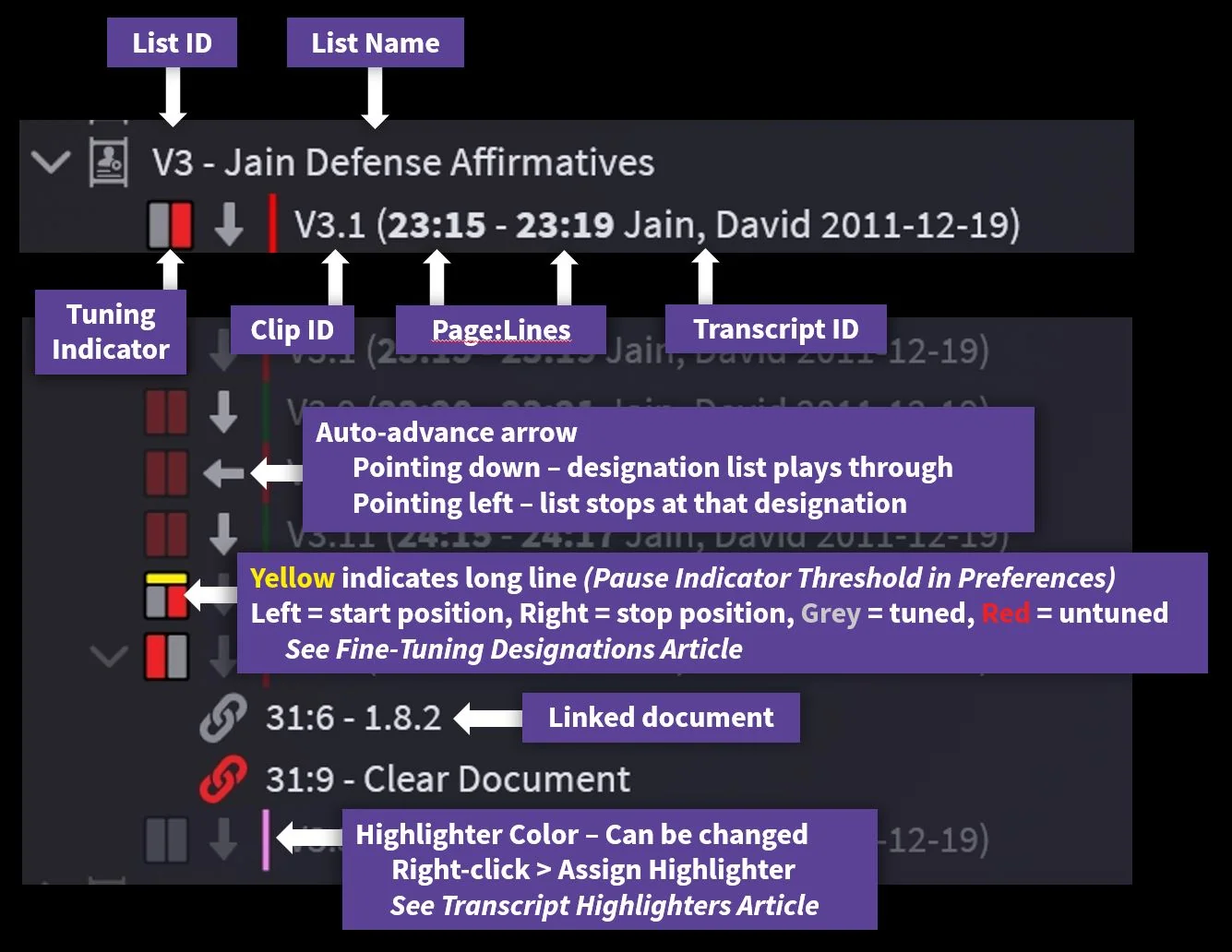
The labeled parts of a designation list, top to bottom:
- List ID and List Name: the list itself (for example, V3 – Jain Defense Affirmatives).
- Tuning Indicator: the colored box beside each clip.
- A yellow bar across the top means a long line (set by Pause Indicator Threshold in Preferences).
- The left half is the start position and the right half is the stop position.
- Gray means tuned and red means untuned. See Basic Fine-Tuning Designations.
- Clip ID, Page:Lines, and Transcript ID: shown on each designation, such as V3.1 (23:15 – 23:19 Jain, David 2011-12-19).
- Auto-advance arrow: pointing down, the list plays straight through; pointing left, it stops at that designation.
- Linked document: a link icon under a designation marks a linked document (shown with the line it appears on and the document ID).
- Highlighter color: the colored bar beside a clip. Change it by right-clicking and selecting Assign Highlighter. See Designation Highlighters.
list ID, clip ID, tuning indicator, auto-advance, long line, linked document
Still stuck? Email support@oncuetech.com.