



notebooks/understanding-your-right-click-menu-notebooksNotebooksnotebooks8right-click menu, context menu, notebook options2026-01-07/articles/rcm-notebooks
Understanding Your Right-Click Menu – Notebooks
Updated January 7, 2026
Many OnCue features are available from right-click menus for various files and work product. If you’re unsure what you can do with an item, right-click it.
Here is a list of articles that show all of the right-click menus in the program:
- Documents (including the Viewer pane with a document showing)
- Audiovisuals (including the Viewer pane with an audiovisual file showing)
- Transcripts (including the Transcript Viewer pane)
- Designations
- Media Scripts
- Notebooks
Note: All individual notebook elements follow the right-click options for those elements (document, designation or audiovisual).
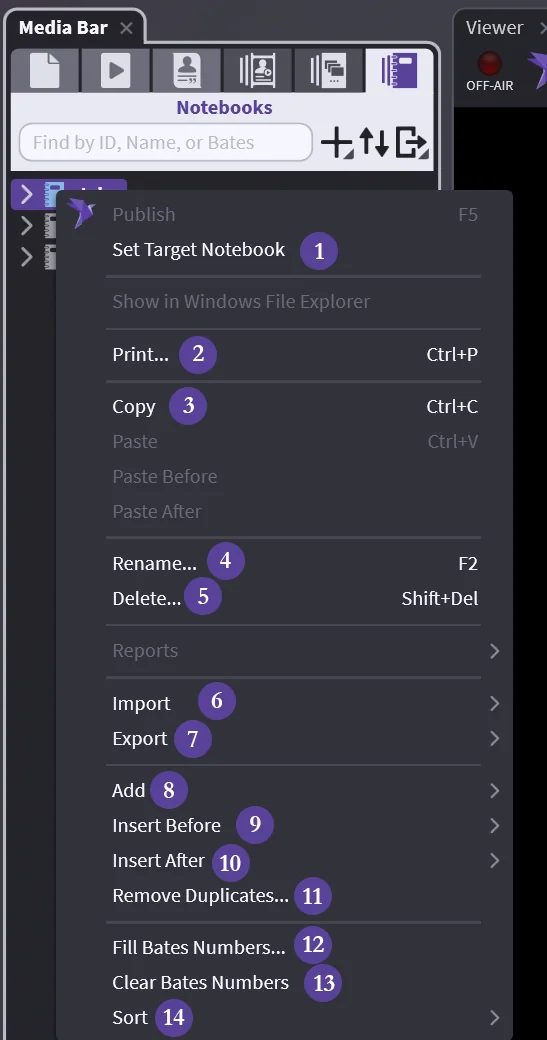
Main Notebook
- Set Target Notebook – Sets the notebook that Ctrl + B sends items to – See Target Notebooks
- Print – Prints the notebook – see Printing for options
- Copy – Copy your entire Notebook and paste – into a Notebook or Media Script
- Rename – Exactly as described
- Delete – Careful – cannot be undone
- Import – All options for imports available - not tied to Notebooks
- Export – All options available
- Add – Lots of options – including adding elements to notebook by typing ID
- Insert Before – Insert New Notebook before existing
- Insert After – Insert New Notebook after existing
- Remove Duplicates… – Removes duplicates from notebook
- Fill Bates Numbers… – Fills Bates numbers for items in the notebook
- Clear Bates Numbers – Clears bates numbers for items in the Notebook
- Sort – Many options – See Sorting Designation Lists
right-click menu, context menu, notebook options
Still stuck? Email support@oncuetech.com.